

“Text to landline” covers two different routes: a carrier can convert a mobile text into a voice call to a fixed-line phone, or a business can text-enable an existing voice number so messages arrive in software. Neither route is the same as ordinary SMS sent from a mobile number and SIM.
For a business, the right choice depends on what the recipient should receive, how they need to reply, and whether keeping the existing voice number matters.
Text to landline in a nutshell
- A traditional landline does not display an ordinary SMS conversation.
- A carrier-supported text-to-landline service can turn the text into a recorded call or voicemail.
- A text-enabled landline or toll-free number uses a separate messaging service and routing setup.
- Written two-way replies require a text-enabled number; a text-to-voice route may offer only a recorded voice reply.
- VoxiSMS sends SMS from an Android phone, active SIM, and mobile number. It does not text-enable landline or toll-free numbers.
| What you need | Route | What the recipient gets | Typical reply path |
|---|---|---|---|
| Deliver a short message to an eligible non-text-enabled landline | Carrier text-to-voice | An automated phone call or voicemail | Provider-specific voice reply or no reply |
| Keep an existing business landline or toll-free number for texting | Text-enablement service | A written message routed to a business inbox or app | Written message through the same service |
| Automate operational SMS from a business mobile number | VoxiSMS with Android and SIM | Ordinary SMS from the mobile number | SMS returns to that mobile number and connected workflow |
If your workflow starts in a booking system, store, CRM, or form, compare the verified options in the VoxiSMS integrations directory.
How carrier text-to-voice delivery works
Carrier behavior varies, so “send it like a normal text” is not a universal promise. Verizon’s current Text to Landline documentation gives a clear U.S. example of this route:
- The sender enters the landline’s phone number in the normal messaging app.
- The carrier checks whether the destination is eligible for its text-to-landline service.
- The service converts the message into recorded speech and calls the landline.
- A person can accept and hear the recording, or an answering machine can receive it as voicemail.
The recipient is not reading an SMS on the landline handset. They are answering a voice call created from the text. In Verizon’s documented route, a person who answers live can record a voice reply, and the sender receives instructions to call another number to hear it. That is different from a written reply returning to the original SMS thread.
Write for a listener, not a screen
A voice-converted message should sound clear when read aloud once. Name the business first, keep the action simple, and include a callback number if the listener may need to respond.
“[Business name]. Your technician is arriving between two and three this afternoon. Call [phone number] if that time does not work.”
Avoid links, emoji, dense reference codes, and unexplained abbreviations. They may be easy to scan on a screen but awkward when synthesized as speech. Use this route for a short, expected update, not for a message that depends on a button, image, or long written reply.
How a business landline becomes text-enabled
Text-enabling a number is a separate service. Instead of converting each incoming text into a voice call, a messaging provider associates the voice number with software that can send and receive written messages.
AT&T’s official Landline Texting API documentation shows the difference. Its service has send and receive functions, uses the same capability across web, desktop, and mobile applications, and verifies number ownership through a call before issuing access credentials. The voice number remains the identity, while the messaging service handles the written route.
Before choosing a text-enablement provider, confirm:
- who must authorize the number;
- where incoming messages appear;
- whether written replies use the same number;
- whether voice service stays with the current provider;
- which automation, scheduling, and reporting features are actually included.
Text-enabled toll-free numbers
Toll-free SMS has an additional U.S. routing layer. Somos describes the TSSRegistry as the centralized database for text-enabled toll-free numbers. A certified Service Registrar submits the enablement request, the Responsible Organization validates it, and routing information is distributed so messages reach the selected provider.
The number holder controls that decision. In its Text-Enabled Toll Free Numbers declaratory ruling, the FCC states that only the toll-free subscriber may authorize text-enablement and that a messaging provider must disable it if the subscriber revokes authorization.
This route makes sense when the toll-free number is already a valuable public contact point and the business wants customers to use that same number for voice and written messages. It is a provider-managed number service, not an Android-and-SIM gateway.
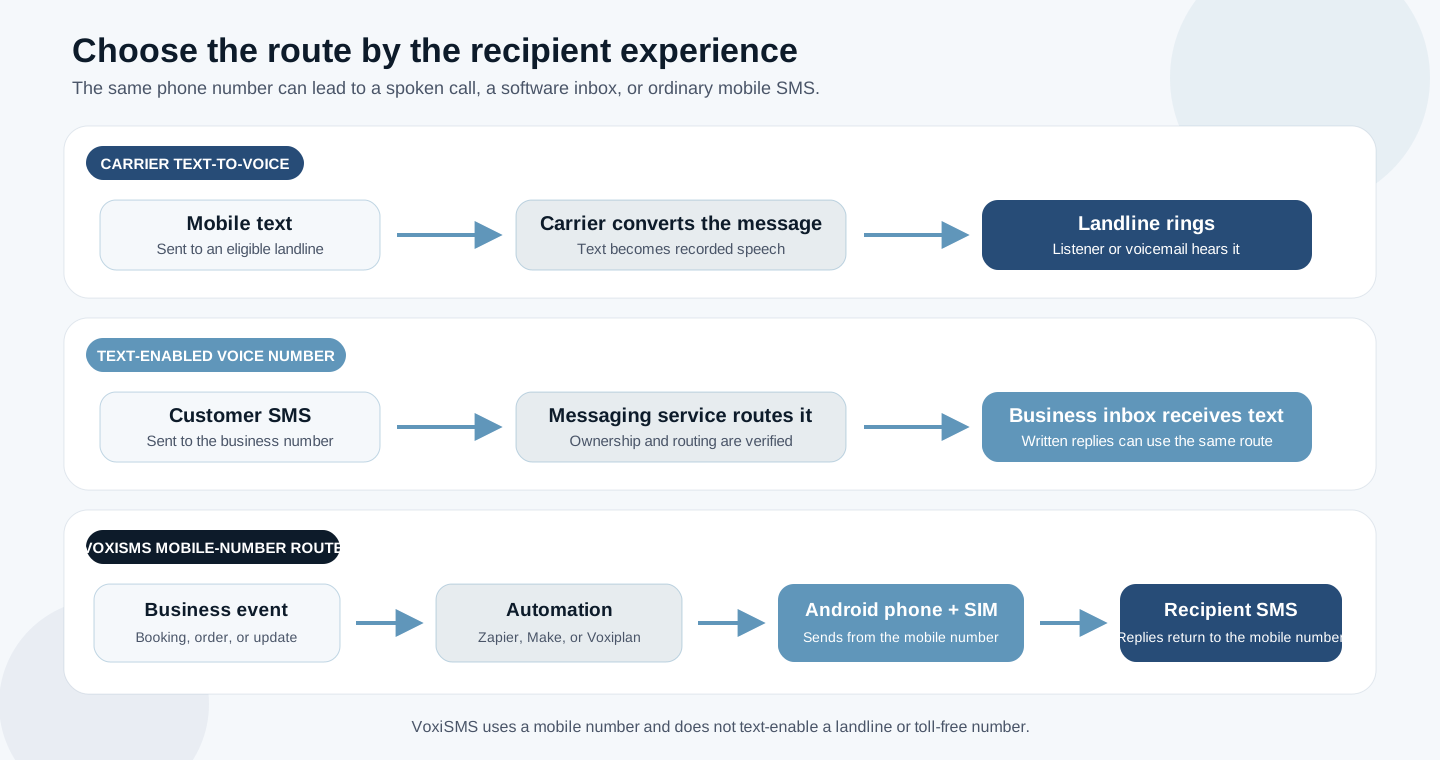
Choose the route by the recipient experience you need
The decision becomes easier when you start with the other person’s experience rather than the phone number alone.
| Decision | Text-to-voice | Text-enabled voice or toll-free number | VoxiSMS mobile-number route |
|---|---|---|---|
| Recipient experience | Phone rings and the message is read aloud | Text appears in a supported messaging conversation | Text arrives as ordinary SMS from the Android phone’s number |
| Best fit | Short, expected, low-frequency update | Keep an established voice number while adding written messaging | Automate operational SMS from a real mobile number |
| Reply behavior | Voice reply or none, depending on provider | Written reply through the text-enablement service | Written reply returns to the mobile number and connected workflow |
| Required setup | Supported sender carrier and eligible destination | Number authorization, messaging provider, and routing | Android phone, active SIM, carrier plan, and VoxiSMS connection |
Where VoxiSMS fits
VoxiSMS is the third route in the diagram. It turns an Android phone with an active SIM into the SMS delivery step for a business workflow. Messages go out from the real mobile number on that device through its existing carrier plan, and VoxiSMS adds no per-message fee.
Choose the connected system that already owns the event:
- Use the VoxiSMS Zapier integration when a form, CRM update, order, or another app event should trigger the message.
- Use the VoxiSMS Make integration for visual scenarios with mapped fields, filters, and routers.
- Use the VoxiSMS and Voxiplan integration for appointment confirmations, reminders, cancellations, follow-ups, and reply routing.
VoxiSMS does not convert a text into a landline voice call, and it does not text-enable an existing landline or toll-free number. If retaining that voice number is essential, choose a verified text-enablement provider. If an Android mobile number suits the workflow, VoxiSMS keeps that number as the sender and connects it to automation.
Ready to test the mobile-number route? Install VoxiSMS from Google Play, connect an Android phone, and send the first message to an internal recipient.
Test the route before you automate it
Run a controlled test with people who know what to expect. This reveals the actual carrier and provider behavior without relying on the number’s appearance or an old support article.
- Confirm whether the destination is a traditional landline, a text-enabled voice number, a toll-free number, or a mobile number.
- Ask the relevant provider what happens when the number receives a text and which reply modes it supports.
- Send a short message while someone answers the landline, then repeat with voicemail if the provider supports text-to-voice delivery.
- Test the reply path. Record whether the sender receives written SMS, a voice-reply notification, or nothing.
- Only then connect the production trigger, populate the real template fields, and verify the result again.
This check is especially useful when a business number has changed provider or been text-enabled separately from its voice service. The workflow should follow the current routing configuration, not assumptions about how the number worked before.
Frequently asked questions
Can every landline receive a text message?
No. Delivery depends on the sender’s carrier, the destination’s eligibility for a text-to-voice service, or whether the number has been text-enabled by a messaging provider. Confirm the route and run a test before relying on it.
Does a traditional landline display the text?
No. A carrier-supported text-to-landline service may convert the message into an automated call or voicemail, but the desk phone is not displaying an SMS thread.
Can someone reply to a text-to-landline message?
It depends on the service. Verizon’s documented text-to-landline route can capture a voice reply when a person answers live. A text-enabled landline service can support written replies in its app or inbox. Check the exact provider rather than assuming both routes behave the same way.
Can a toll-free number receive SMS?
Yes, after the number holder authorizes text-enablement and a certified service handles registry and routing setup. Voice service and messaging can share the number, but the messaging path is managed separately.
Does VoxiSMS text-enable a landline or toll-free number?
No. VoxiSMS uses an Android phone, active SIM, real mobile number, and existing carrier plan. It is a business SMS automation gateway for that mobile route.
Compare the VoxiSMS integration paths, then start with the system that owns the booking, order, enquiry, or operational update.
