Failed is not the same as cancelled
Copy the billing system's real state into the message. Do not tell a customer that service ended if the invoice is simply open or a retry is scheduled.

Send a useful billing message when a recurring charge fails. Keep the payment system in control of account status while VoxiSMS sends the text from your business's own Android phone and mobile number.
A failed-payment SMS is a short billing message triggered by a recurring charge or invoice failure. With VoxiSMS, the event travels through Zapier or Make and the connected Android phone sends it through its own SIM and real number.
Keep each text specific enough to explain why it arrived. Replace the placeholders with current billing data, use one verified link, and stop the sequence as soon as the payment state changes.
| Moment | Trigger | Example message | Stop condition |
|---|---|---|---|
| First failure | The initial recurring charge fails | [Business]: We couldn't process your [plan] payment. Update your payment method securely: [verified link]. | Payment succeeds or the account closes |
| Action required | The payment needs customer authentication | [Business]: Your [plan] payment needs one more step. Complete it securely here: [verified link]. | Authentication and payment complete |
| Retry scheduled | The billing system schedules another attempt | [Business]: Your [amount] payment did not go through. We'll retry on [date]. Update your payment details: [verified link]. | The retry date changes or payment succeeds |
| Still unpaid | The invoice remains open after a retry | [Business]: Your [invoice or plan] is still unpaid. Use this secure link to update payment: [verified link]. Reply if you need help. | Payment succeeds or support takes over |
| Payment restored | A previously failed payment succeeds | [Business]: Thanks, your [plan] payment is now complete. No further action is needed. | Send once |
| Human help | The customer replies or a case needs review | [Business]: We can help with your payment question. Reply with a good time to contact you. Please don't send card details by text. | A team member owns the conversation |
Stripe documents invoice.payment_failed
as a subscription event and recommends notifying the customer to update
the payment method. Its subscription webhook guide also shows why later invoice and payment events should control the rest
of the sequence.
One workflow can cover the first failure. A separate workflow can confirm recovery. This makes the trigger, message, and stop condition easier to test.
Copy the billing system's real state into the message. Do not tell a customer that service ended if the invoice is simply open or a retry is scheduled.
Send the customer to the billing provider or your own secure account page. The SMS should never collect complete payment details.
The billing platform remains the source of account status. The automation prepares the recipient and message. VoxiSMS hands the SMS to the selected Android phone for sending.
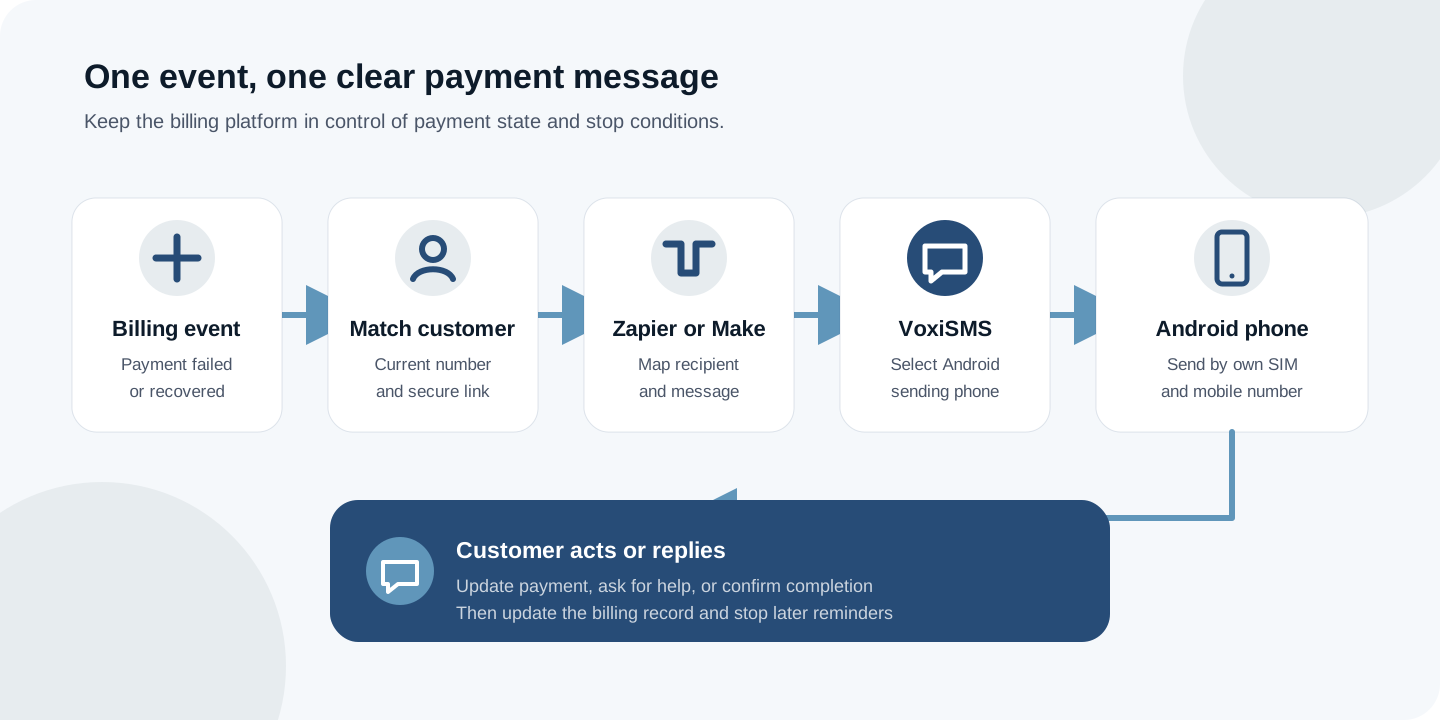
Start in the VoxiSMS integrations hub, then choose the workflow tool that already receives your billing event.
Zapier path
Zapier's current Stripe integration directory lists failed-payment and failed-invoice triggers. Map that record into the recipient and message fields in the approved VoxiSMS Zapier action.
Make path
Make documents how custom webhooks trigger scenarios. After the event arrives, map the customer fields into the VoxiSMS Make module and choose the sending phone.
The selected Android phone sends through the mobile plan already active on its own SIM and real number. Keep that device connected while the workflow is running.
Start with a failed charge, failed invoice, or equivalent event that your billing system records. Keep one event definition per workflow.
Pull the current mobile number, business name, plan or invoice label, and the minimum context needed to explain the message.
Use your billing provider's secure HTTPS page. Do not ask a customer to send card or bank details by SMS or reply.
In Zapier or Make, map the recipient and message into VoxiSMS, then select the connected Android phone that should send it.
Confirm the message for a test failure, a successful payment, a missing phone number, and an inbound reply before switching the workflow on.
A billing notification is only useful when it reflects the latest record. Before launch, verify the failure, recovery, and exception paths with test customers.
A payment notice and a promotion serve different purposes. Keep the dunning text focused on the customer's account, use the right contact permission for that message, and honor an opt-out or wrong-number reply without adding a marketing offer.
Direct answers about dunning messages, Stripe events, replies, mobile numbers, and payment recovery states.
A dunning SMS is a short billing message sent after a payment fails or remains unpaid. It should identify the business, explain the required action, and point to a verified payment route without asking for sensitive payment details by text.
Yes, when the Stripe event is connected through a supported workflow such as Zapier or Make. The billing platform supplies the payment event; VoxiSMS handles the SMS action through the connected Android phone.
No. VoxiSMS sends through the real mobile number on your connected Android phone and SIM, so the message can come from a number your business already uses.
Yes. VoxiSMS can pass inbound replies back into the connected workflow, where your team can answer or update the billing record.
VoxiSMS adds no per-message fee. The connected phone sends through the mobile plan already active on its SIM.
Treat the billing system as the source of truth. A successful-payment event should stop pending reminders and, when useful, trigger one short confirmation that no further action is required.
Install VoxiSMS on the sending phone, connect one billing event, and test the failure, reply, and successful-payment paths end to end.