Booking or calendar
Use: Customer name, service, completed status, mobile number
Skip: The visit was cancelled, missed, or still in progress

Send a short review invitation after a completed appointment, order, or service job. Zapier, Make, or Voxiplan supplies the trigger; VoxiSMS sends it from your own Android number.
Use a direct review link and one neutral request that fits the interaction.

Quick answer
VoxiSMS is an Android SMS gateway for businesses that want review requests to follow completed appointments, orders, and service jobs. Zapier, Make, or Voxiplan supplies the workflow trigger, while VoxiSMS sends the text through the business's own Android phone and mobile number.
Replace every placeholder with trusted workflow data. Each message names the business, identifies the interaction, and gives the customer one review destination.
| Use case | Useful trigger | Example text |
|---|---|---|
| Appointment completed | The appointment status changes to completed | [Business]: Thanks for visiting us for [service] today. If you would like to share your experience, leave a Google review here: [review link] |
| Field job closed | A technician closes the work order | [Business]: Your [service] job is complete. We would value your feedback on the visit: [review link] |
| Order delivered | The order reaches its delivered state | [Business]: Order [order number] has been delivered. If you would like to review your experience, use this link: [review link] |
| Restaurant visit or pickup | The reservation or pickup order is completed | [Business]: Thanks for your visit today. You can share your experience here: [review link] |
| Support case resolved | A support ticket is marked resolved | [Business]: We have closed support case [reference]. If you would like to review the experience, here is the link: [review link] |
| Property viewing or meeting | The scheduled meeting ends | [Business]: Thanks for meeting with [name] about [service]. You can share feedback on the experience here: [review link] |

The source system should supply both the completion signal and the customer fields. That keeps the request tied to a real appointment, order, job, or support interaction.
Use: Customer name, service, completed status, mobile number
Skip: The visit was cancelled, missed, or still in progress
Use: Job reference, service type, close time, customer number
Skip: The work order is open or needs another visit
Use: Order reference, delivery status, customer number
Skip: The order is delayed, returned, or not delivered
Use: Case reference, resolved status, contact number
Skip: The case was reopened or the contact is not the customer
Use: Appointment outcome, contact record, mobile number
Skip: The appointment did not reach the selected completed outcome
A practical formula is: business name + completed interaction + optional invitation + direct review link.
Keep the source event, workflow fields, automation bridge, Android sender, and customer review link visible in one testable path.
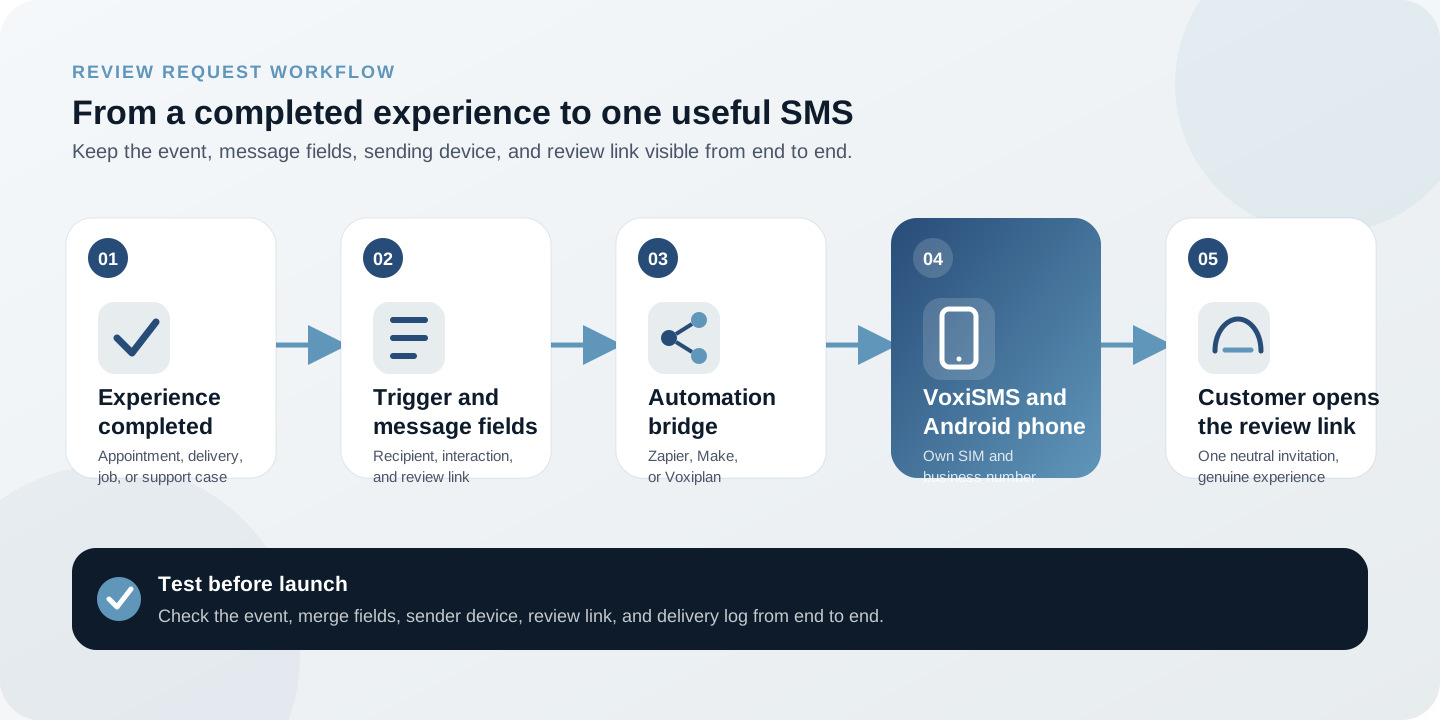
Swipe horizontally to inspect each workflow step.
Start with one completion event and one message. Google explains how to copy a direct review link from the Business Profile.
Get a Google review linkIn the Google Business Profile, open Read Reviews, choose Get more reviews, and copy the direct review link.
Use a reliable status such as appointment completed, order delivered, job closed, or support case resolved.
Require a valid mobile number and the business data needed to make the message specific to the interaction.
Map the business name, service or reference, and direct review link into one short, neutral request.
Choose the connected Android phone so the text goes through its own SIM, real number, and active carrier plan.
Complete a test record, receive the SMS, open the review link, and confirm that incomplete events do not send.
Keep the completion event in the source system. Use the integration to check the record, build the message, and send it to VoxiSMS.
Use an app trigger or webhook for the completed event, add any filters and field formatting, then send through VoxiSMS.
Build a review request with ZapierWatch the source system for a completed record, map the review message, and route the SMS to the connected Android phone.
Build a review request with MakeUse a completed appointment as the source event, then send the follow-up through VoxiSMS from the business mobile number.
Connect Voxiplan and VoxiSMSGoogle's Maps contribution policy allows businesses to solicit genuine experiences, but prohibits incentives, selectively asking for positive reviews, discouraging negative reviews, or pressuring people to include specific content. Use an objective completion event for every eligible customer rather than a satisfaction score. Read the Google Maps user-contributed content policy.
VoxiSMS adds no per-message fee and sends through the mobile plan already active on the Android device. Test with the exact phone, number, trigger, and link the live workflow will use.
Clear answers about message wording, timing, Google review links, Android delivery, and per-message fees.
Name the business, connect the message to the completed interaction, and provide one direct review link. Keep the wording neutral and avoid promising a reward or asking specifically for a positive review.
Use a verified completion event such as a finished appointment, delivered order, closed service job, or resolved support case. The exact delay belongs in the automation and should match the customer's interaction.
Google Business Profile provides a direct review link from the Read Reviews area under Get more reviews. Copy that destination and test it before adding it to the workflow.
Yes. Zapier, Make, or Voxiplan can supply the completed event and message fields. VoxiSMS then sends the text through the connected Android phone and its mobile number.
No. VoxiSMS adds no per-message fee. The connected Android phone sends through the mobile plan already active on its SIM.
Install VoxiSMS on the business Android phone, connect one completed event, and test the direct review link from trigger to delivery.